Sllucaj 1. Sometimes this can be caused by an overheating situation. Itunes, RealPlayer, Windows Media player, etc. require a lot of processing power to decompress and decode music files, which can cause the processor or hard drive to get hot.
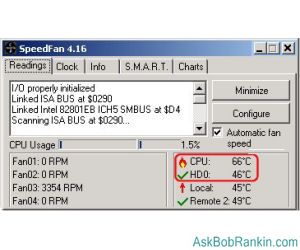
If your CPU is running at over 60 degrees (C) you might be at risk of burning it out. Some systems shut down automatically when the temperature reaches an unsafe level. Every few weeks I open my system unit and clean the fins on the heat sink that sits under the CPU. When they collect dust it restricts the airflow and prevents proper cooling. You can use a can of compressed air (look at your local office supply store) or an old toothbrush. I just did that on my system and the CPU temperature dropped by ten degrees!
Download the free
SpeedFan utility and it will tell you the temperature at which your CPU and hard drives are running.
Slucaj 2.
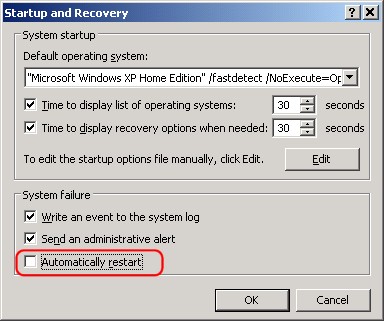
There's a setting buried in Windows XP that tells your computer to restart when a system error occurs. If you turn off that option, you may solve your automatic reboot problem.
Click Start, then open Control Panel
Click Performance and Maintenance
Click System
Click on the Advanced Tab
Click Settings in the Startup and Recovery section
Uncheck Automatically Restart in the System failure section
Note that this may prevent the system from restarting, but it can also mask the true problem. As an alternative to this measure, consider what has recently changed on your system. If you have installed new hardware or software, remove it and see if the annoying restart persists. Sometimes downloading the latest driver software from the manufacturer's website will fix hardware incompatibility problems that cause restarts.











 )


 Bivši GAMERS.ba član? Vrati profil